PyMol Screen Layout
What information is displayed in each area on PyMol Screen?
✍: FYIcenter.com
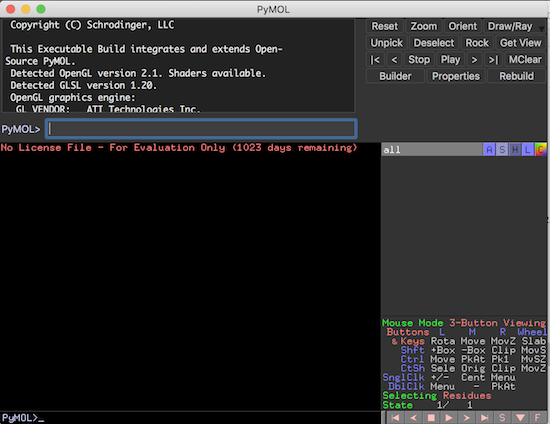
 Once PyMol is started, you should see two windows displayed:
External GUI - A Graphical User Interface window with the following areas:
1. Output message area - An area where output messages are displayed. Initially, the output area displays the following message:
Copyright (C) Schrodinger, LLC

This Executable Build integrates and extends Open-Source PyMOL.
Detected OpenGL version 2.1. Shaders available.
Detected GLSL version 1.20.
OpenGL graphics engine:
 GL_VENDOR:   ATI Technologies Inc.
 GL_RENDERER: AMD Radeon Pro 450 OpenGL Engine
 GL_VERSION:  2.1 ATI-1.51.8
No License File - For Evaluation Only (23 days remaining)
Detected 8 CPU cores.  Enabled multithreaded rendering.
2. Command input area - An area below the output message area where PyMol commands can be entered.
3. Command button area - An area on the right side of the output message area where a set of command buttons are displayed.
Viewer Window - A graphical display window with the following areas:
1. Viewer area - An area where the molecule is rendered as a graphical image. Initially, the molecule viewer displays a blank area.
2. Command input area - An area below the viewer area where PyMol commands can be entered.
3. Object name area - An area where a list of objects identified in the molecule is displayed. Initinaly, the object area is empty.
4. Mouse infomation area - An area where help information are displayed to tell you how to control the visualization with the mouse.
5. Movie control area - An area where movie editing and playing controls are displayed.
Â
⇒ Load Molecule Strcuture from File
⇑⇑ PyMol Tutorials
2020-08-03, 2819🔥, 1💬
Related Topics:

