Run Open Babel GUI on Windows
How to run OpenBabelGUI on Windows computers?
✍: FYIcenter.com
 Open Babel GUI is the graphical user interface for Open Babel.
You can use Open Babel GUI to open a molecule file in any supported format
and convert it to any other format.
Open Babel GUI is the graphical user interface for Open Babel.
You can use Open Babel GUI to open a molecule file in any supported format
and convert it to any other format.
Here is how to Open Babel GUI on Windows.
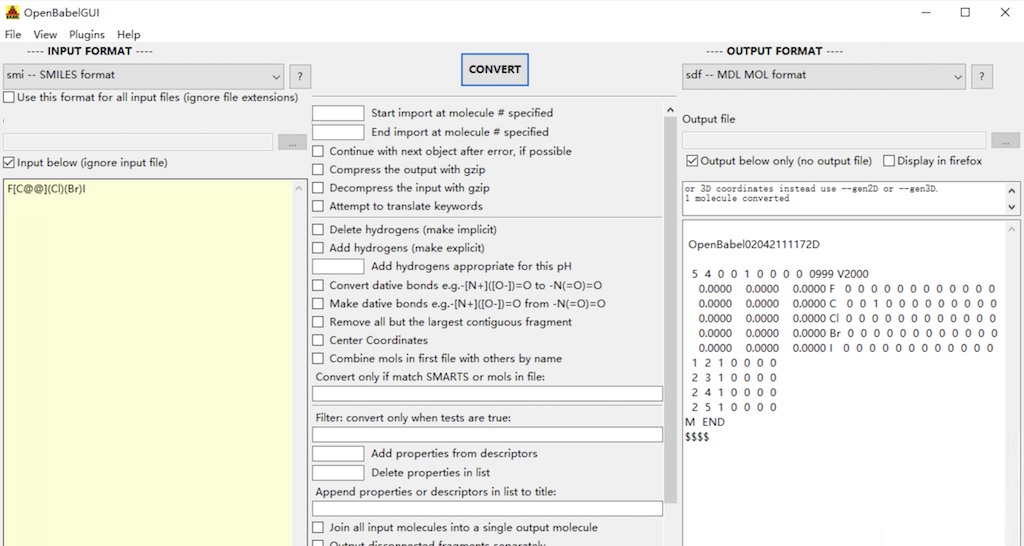
1. Search for "Open Babel GUI" in "Start > Search" box.
2. Click "Open Babel GUI" in the search result list. You see Open Babel GUI window displayed.
3. Keep "smi -- SMILES format" as the INPUT FORMAT.
4. Check to select the "Input below (ignore input file)" checkbox. And enter the following SMILES string:
F[C@@](Cl)(Br)I
5. Change the OUTPUT FORMAT to "sdf -- MDL MOL format" on the right side.
6. Click the "CONVERT" button in the middle. You see the converted molecule displayed in SDF/Mol format.
⇒ Structure Display Command on Open Babel GUI
⇐ Install Open Babel Binary Package on Windows
2021-03-07, 6382🔥, 0💬
Related Topics:

 Molecule FYI-1000237
Molecule Summary: ID: FYI-1000237 SMILES: CCCCC Received at FYIcenter.com on: 2021-02-04 2021-02-17, 3591🔥, 0💬
Molecule FYI-1000235
Molecule Summary: ID: FYI-1000235 SMILES: COC1=CC=C(C=C1)C=O Received at FYIcenter.com on: 2021-01-29 2021-02-17, 3388🔥, 0💬