Multiple Selections with Embedded 3Dmol Viewer
How to create multiple selections apply different styles with Embedded 3Dmol Viewer?
✍: FYIcenter.com
 In order to create a separate selection, you need add a suffix code
to the "data-select" attribute name as "data-select{code}".
Then other selection related attributes can use the same suffix code
to refer to the separate selection.
In order to create a separate selection, you need add a suffix code
to the "data-select" attribute name as "data-select{code}".
Then other selection related attributes can use the same suffix code
to refer to the separate selection.
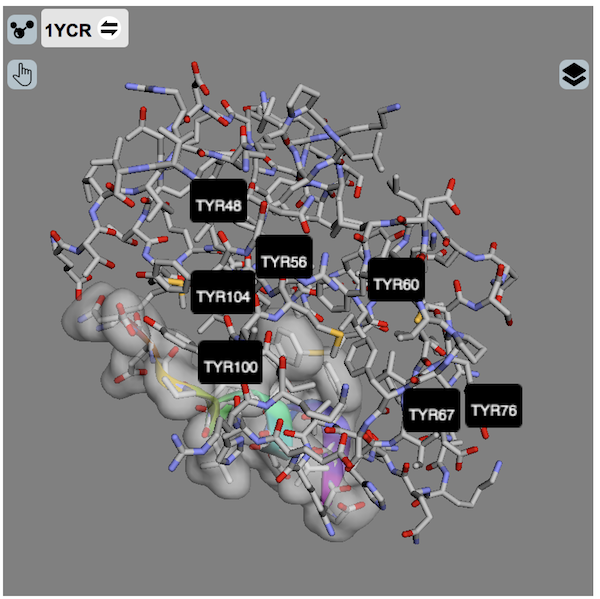
Here is an HTML code example, Embedded-Viewer-Multi-Selection.html, that uses multiple selections. "data-style='stick'" applies to the entire model, which is the default selection. "data-style1='...' and data-surface1='...'" apply to the selection with a suffix of "1". "data-labelresX='font:14'" applies to the selection with a suffix code of "X".
<html><head>
<script src="/3Dmol-min.js"></script>
</head>
<body>
<div style="height: 400px; width: 400px; position: relative;"
  class='viewer_3Dmoljs'
  data-backgroundcolor='gray'
  data-pdb='1YCR'
  data-style='stick'
  data-select1='chain:B' data-style1='cartoon:color=spectrum' data-surface1='opacity:.7;color:white'
  data-selectX='resn:TYR' data-labelresX='font:14'
  data-ui="true"
/>
</body></html>
This example HTML code will display a PDB protein in cartoon style:
⇒ 3Dmol.js Bug - data-ui=true Impacts on Selection
⇐ Assign Embedded 3Dmol Viewer to DIV
⇑⇑ 3Dmol.js FAQ
2023-01-30, 874🔥, 0💬
Related Topics:
