"babel ... -o svg -xi" - Show Atom Indices in SVG
How to show atom indices in a molecule SVG picture? I want to see in what order each atom is listed in the SMILES string.
✍: FYIcenter.com
 The SMILES string list each atom a molecule is a specific sequence.
You can use the "-xi" option when generating the SVG file
to show the index of each atom
corresponding to the order of atoms in the SMILES string.
The SMILES string list each atom a molecule is a specific sequence.
You can use the "-xi" option when generating the SVG file
to show the index of each atom
corresponding to the order of atoms in the SMILES string.
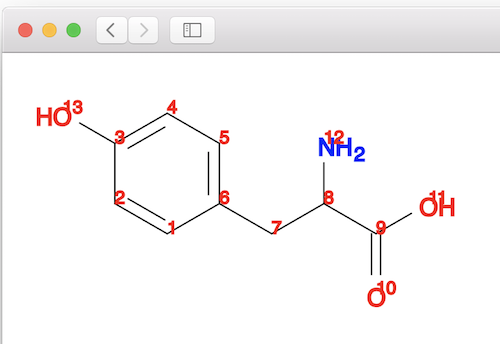
For example, the following command generate a SVG picture of the tyrosine molecule from a SMILES string:
fyicenter$ obabel "-:c1cc(ccc1CC(C(=O)O)N)O" -o svg -O tyrosine-i.svg -xi

1 molecule converted
Open the output file, tyrosine-i.svg, in a Web browser, you see tyrosine molecule structure displayed with SMILES index number on each atom.
⇒ "babel ... -o svg -xS" - Ball/Stick Depiction in SVG
⇐ "obabel ... -o svg" Command - Generate SVG from SMILES
2021-02-04, 1822🔥, 0💬
Related Topics:
